Hilfe
Allgemeines
Welche Arten der Bescheidbekanntgabe gibt es?
Bescheidbekanntgabe in Papierform
Sie bekommen den Bescheid wie bisher auf dem Postweg übermittelt. Zusätzlich können Sie sich über den Service „Abholung von Bescheiddaten“ die Kennzahlen und Werte aus dem Bescheid elektronisch bereitstellen lassen. Anschließend kann Ihr Softwareprogramm die Werte aus Ihrer übermittelten Steuererklärung mit den von der Finanzverwaltung bereitgestellten Werten aus dem Einkommensteuer-, Umsatzsteuer- bzw. Gewerbesteuermessbescheid auf Abweichungen abgleichen.
Bescheidbekanntgabe in elektronischer Form durch Bereitstellung zum Datenabruf
Bei der Bekanntgabe in elektronischer Form bekommen Sie den Bescheid nicht auf dem Postweg übermittelt. Per E-Mail werden Sie über die Bereitstellung des Bescheids zum Datenabruf benachrichtigt (ein Bescheid ist in dieser E-Mail nicht enthalten). Diese Benachrichtigungs-E-Mail wird unverschlüsselt verschickt, sie enthält neben der Steuernummer und einer Kurzbezeichnung um welchen Bescheid es sich handelt, aber keine weiteren personenbezogenen Daten.
Um vom Inhalt des Bescheids Kenntnis zu nehmen, ist die Durchführung des Datenabrufs in Ihrer verwendeten Software erforderlich. Im Anschluss daran können Sie den Bescheid (pdf-Datei) einsehen und abspeichern. Weitere Informationen
FAQ zur Abholung von Bescheiddaten
Was ist der Service "Abholung von Bescheiddaten?"
Beim Service „Abholen von Bescheiddaten“ haben Sie die Möglichkeit sich die Bescheiddaten zusätzlich zum Steuerbescheid bereitstellen zu lassen.
Wo liegt der Unterschied zum Bescheid in elektronischer Form?
Der Bescheid in elektronischer Form (digitaler Steuerbescheid) wird im PDF-Format in der jeweils verwendeten Software zum Abruf bereitgestellt. Er entspricht dem Layout eines Papierbescheides.
Bei dem Service „Abholung von Bescheiddaten“ hingegen geht es um die Bereitstellung von Kennzahlen und Werte um zum Beispiel einen Vergleich mit den übermittelten Daten anzuzeigen. Der Service „Abholung von Bescheiddaten“ entfaltet im Gegensatz zum Bescheid in elektronischer Form keine rechtliche Bindungswirkung.
Wer kann eine Abholung von Bescheiddaten beantragen?
Sofern die verwendete Software die Möglichkeit anbietet, kann dieser Service bei jeder Erstellung einer Steuererklärung beantragt werden. Bei der Verwendung von Mein ELSTER ist eine separate Beantragung nicht notwendig, die Bescheiddaten werden hier immer automatisch beantragt.
Wie kann die Abholung von Bescheiddaten beantragt werden?
Bei einer Übermittlung einer Steuererklärung mit Mein ELSTER werden immer automatisch die elektronischen Bescheiddaten beantragt.
Bei anderen Softwareanbietern erfolgt die Beantragung je nach Softwarehersteller unterschiedlich. Informieren Sie sich ggf. bei dem Hersteller der von Ihnen verwendeten Software.
Für welche Steuerarten ist die Abholung der Bescheiddaten möglich?
Es können aktuell Bescheiddaten zur Einkommensteuer, Umsatzsteuer und zum Gewerbesteuermessbetrag abgeholt werden.
In den Stadtstaaten Berlin, Bremen und Hamburg können daneben auch die Bescheiddaten zu der Gewerbesteuer abgeholt werden.
Welche Vorteile habe ich?
Durch die Abholung der Bescheiddaten erhalten Sie die Werte aus Ihrem Steuerbescheid (Bescheid in elektronischer oder Papierform) zusätzlich elektronisch in der von Ihnen verwendeten Software aufbereitet. Sie können einen Bescheiddatenvergleich mit den von Ihnen übermittelten Daten vornehmen und erkennen somit direkt Abweichungen zum Steuerbescheid vom Finanzamt.
Wie lange stehen Bescheiddaten zur Abholung zur Verfügung?
Die Bescheiddaten stehen 180 Tage nach Bekanntgabe zur Abholung zur Verfügung. Nicht abgeholte Bescheiddaten werden nach 180 Tagen, abgeholte Bescheiddaten 60 Tage nach Abholung gelöscht.
Erhalte ich zusätzlich einen Steuerbescheid?
Die Bescheiddaten haben im Gegensatz zum offiziellen Bescheid in elektronischer oder Papierform keine rechtliche Bindungswirkung. Ihre Bereitstellung stellt entsprechend lediglich eine freiwillige Serviceleistung der Länder dar. Deshalb erhalten Sie immer zusätzlich Ihren rechtsverbindlichen Bescheid.
Wie kann ich Bescheiddaten abholen?
Die elektronische Bescheiddatenabholung erfolgt über die von Ihnen bei der Übermittlung der Steuererklärung verwendeten Software. Informieren Sie sich ggf. bei dem Hersteller dieser Software.
Wie erfolgt die Bescheiddatenabholung bei Mein ELSTER?
Nach Erhalt einer E-Mail über die zur Abholung bereitgestellten Bescheiddaten werden Sie direkt nach dem Login in Mein ELSTER automatisch auf die Abholung der Bescheiddaten hingewiesen. Die verfügbaren Daten können abgeholt werden und befinden sich nach dem Download im PDF-Format in Ihrem Posteingang bei Mein ELSTER. Nach einem Login können die Bescheiddaten über den Posteingang aufgerufen werden.
Kann ich die Bescheiddaten eines geänderten Steuerbescheides abholen?
Wird ein Steuerbescheid geändert, erfolgt keine Bereitstellung dieser Bescheiddaten.
Wer ist für inhaltliche Fragen zum Service „Abholung von Bescheiddaten“ zuständig?
Bei Fragen zum Inhalt Ihrer Bescheiddaten wenden Sie sich an Ihr zuständiges Finanzamt.
Bei Fragen zur Abholung Ihrer Bescheiddaten wenden Sie sich an die ELSTER-Hotline.
Was ist der Inhalt der "Berechnung des Finanzamts zur Einkommensteuer" (frühere Bescheiddaten) in meinem Posteingang?
Was ist die Berechnung des Finanzamts zur Einkommensteuer?
Die Berechnung des Finanzamts zur Einkommensteuer (frühere Bescheiddaten) ist ein automatisch erstellter Datenauszug der Finanzverwaltung, der die festgesetzte Einkommensteuer für das jeweilige Steuerjahr berechnet. Das Dokument hat keine rechtliche Bindungswirkung - der offizielle Steuerbescheid per Post oder digital im ELSTER-Postfach ist maßgeblich.
Die Berechnung enthält im Wesentlichen:
- die steuerlichen Grundlagen (Einkünfte, Sonderausgaben, zu versteuerndes Einkommen),
- die berechnete Steuer und Solidaritätszuschlag,
- bereits abgeführte Lohnsteuer und die Erstattungs- oder Nachzahlungsbeträge,
- sowie wichtige Erläuterungen zur Vorläufigkeit und zur Aufbewahrungspflicht
Aufgrund eines „Vorläufigkeitsvermerks“:
- können bestimmte Punkte (z. B. Rentenversicherungsbeiträge, Solidaritätszuschlag) noch rechtlich geprüft werden
- Wenn es zu einem Grundsatzurteil kommt, wird der Bescheid ggf. automatisch angepasst – sie müssen nicht selbst aktiv werden
Was soll ich mit der Berechnung tun?
1. Berechnung prüfen
Vergleichen Sie die Werte mit Ihrer eingereichten Steuererklärung:
- Bruttoarbeitslohn
- Werbungskosten (z. B. Fahrtkosten, Fortbildung, Verpflegung)
- Sonderausgaben (z. B. Vorsorgeaufwendungen)
- Ergebnis: zu versteuerndes Einkommen und Höhe der Steuer
2. Verbleibenden Betrag beachten
Das Dokument zeigt:
- Was festgesetzt wurde (z. B. Einkommensteuer)
- Was bereits über Lohnsteuer abgeführt wurde
- Ob Sie Geld zurückbekommen oder nachzahlen müssen
→ Der „verbleibende Betrag“ ist das Wichtigste:
- Negativ = Erstattung
- Positiv = Nachzahlung
3. Offiziellen Steuerbescheid abwarten
Kurze Zeit später erhalten Sie den offiziellen Steuerbescheid, dort stehen:
- ggf. Erläuterungen zu Abweichungen
- genaue Zahlungsfristen
- zulässige Rechtsmittel (z. B. Einspruch)
Was ist der Vergleich?
Der Vergleich ist ein unverbindlicher Abgleich zwischen:
- Ihren Angaben in der Steuererklärung und
- den Werten aus ihrem Steuerbescheid.
Es wird zeitgleich mit Ihrem Steuerbescheid erstellt. Es dient dazu, Abweichungen zur eingereichten Steuererklärung ersichtlich zu machen.
Wichtig: Der Vergleich ist ein Service der Länder und hat keine rechtliche Bindungswirkung! Nur der offizielle Steuerbescheid ist ein rechtlich bindendes Dokument.
Was kann ich mit dem Vergleich tun?
1. Vergleich prüfen
- Achten Sie auf Abweichungen (z. B. beim Bruttolohn, Sonderausgaben, Einkommen)
- Beachten Sie, dass Angaben fehlen können. Diese sind mit einem „-*-“ markiert.
2. Abweichungen verstehen
- Habe ich mich eventuell vertippt?
- Hat das Finanzamt zusätzliche Pauschalen berücksichtigt?
- Habe ich angeforderte Belege nicht eingereicht?
3. Steuerbescheid abwarten
- Der Steuerbescheid kommt digital in Ihr ELSTER-Postfach oder kurze Zeit später per Post
- Darin stehen Erläuterungen zu Abweichungen – z. B. warum bestimmte Ausgaben nicht anerkannt wurden.
- Sind Sie mit den Abweichungen nicht einverstanden? Dann haben Sie die Möglichkeit über die sonstige Nachricht eine Änderung zu beantragen oder einen Einspruch einzulegen.
Wie ist der Vergleich aufgebaut?
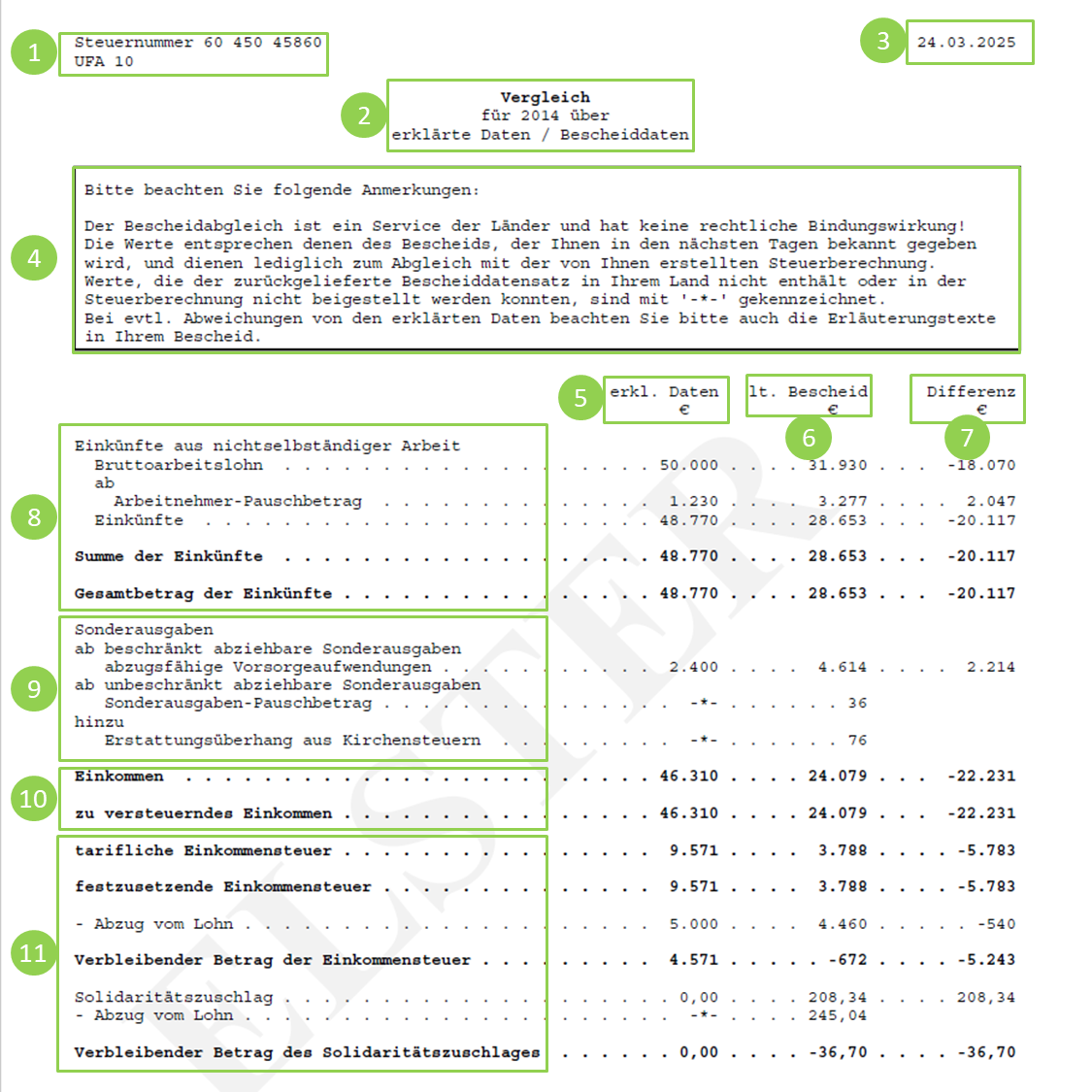
| Inhalt | Erklärhilfe |
|---|---|
| (1) Steuernummer & UFA | Die Steuernummer ist eine vom Finanzamt vergebene Nummer, die zur Identifikation eines konkreten Bearbeitungsfalls dient. Weitere Informationen zur Steuernummer finden Sie hier. Die Steuernummer ist nicht identisch mit der persönlichen steuerlichen Identifikationsnummer (IdNr). UFA ist eine interne Information und hat für Sie keine Bedeutung. |
| (2) Vergleich für das Jahr XXXX über erklärte Daten / Bescheiddaten | Die Daten im Vergleich beziehen sich auf das angegebene Jahr. |
| (3) Ausstellungsdatum | Das Ausstellungsdatum bezeichnet den Tag, an dem der Vergleich erstellt wurde. |
| (4) Hinweistext | Der Hinweistext gibt Ihnen allgemeine Informationen zum Vergleich und zur Bindungswirkung. |
| (5) Erklärte Daten € | Das sind Ihre Angaben aus der Steuererklärung. |
| (6) Lt. Bescheid € | Das sind die Werte aus ihrem Steuerbescheid. |
| (7) Differenz € |
|
| (8) Einkünfte | Einkünfte sind die Einnahmen abzüglich der Betriebsausgaben oder Werbungskosten. |
| (9) Sonderausgaben | Sonderausgaben stehen nicht im direkten Zusammenhang mit den Einkünften. Dazu gehören z. B. Versicherungsbeiträge, Spenden und Kirchensteuer. |
| (10) Einkommen | Das zu versteuernde Einkommen ist die Summe aller Einkünfte nach Abzug aller möglichen Abzugsbeträge. Dies ist die Bemessungsgrundlage für die Einkommensteuer. |
| (11) Einkommensteuer & Solidaritätszuschlag | Verbleibender Betrag der Einkommenssteuer, des Solidaritätszuschlags und ggf. der Kirchensteuer Bitte beachten Sie: Gezahlte Vorauszahlungen sind hier nicht enthalten. |